
The Launchpad
The SDK ships the landing zone. Every user who signs in arrives at the LUX Launchpad — a page of tiles, one per app they may open, and nothing they may not.
It is the one app in the suite that is never gated. It carries no #[Access], and it never will: that is a guaranteed invariant, not an oversight. Anyone who is signed in can reach it, which is what makes it safe to land on — after a login, after a password reset, and above all after an impersonation switch, where the acting partner may have access to nothing else. Gating it later would be a breaking change.
The SDK also owns the named route that gets people there:
GET /ui5/dashboard → redirect to the Launchpadlaravelui5/auth falls back to route('dashboard') when it has nowhere better to send someone, and so does the impersonation handler. You do not have to define it.
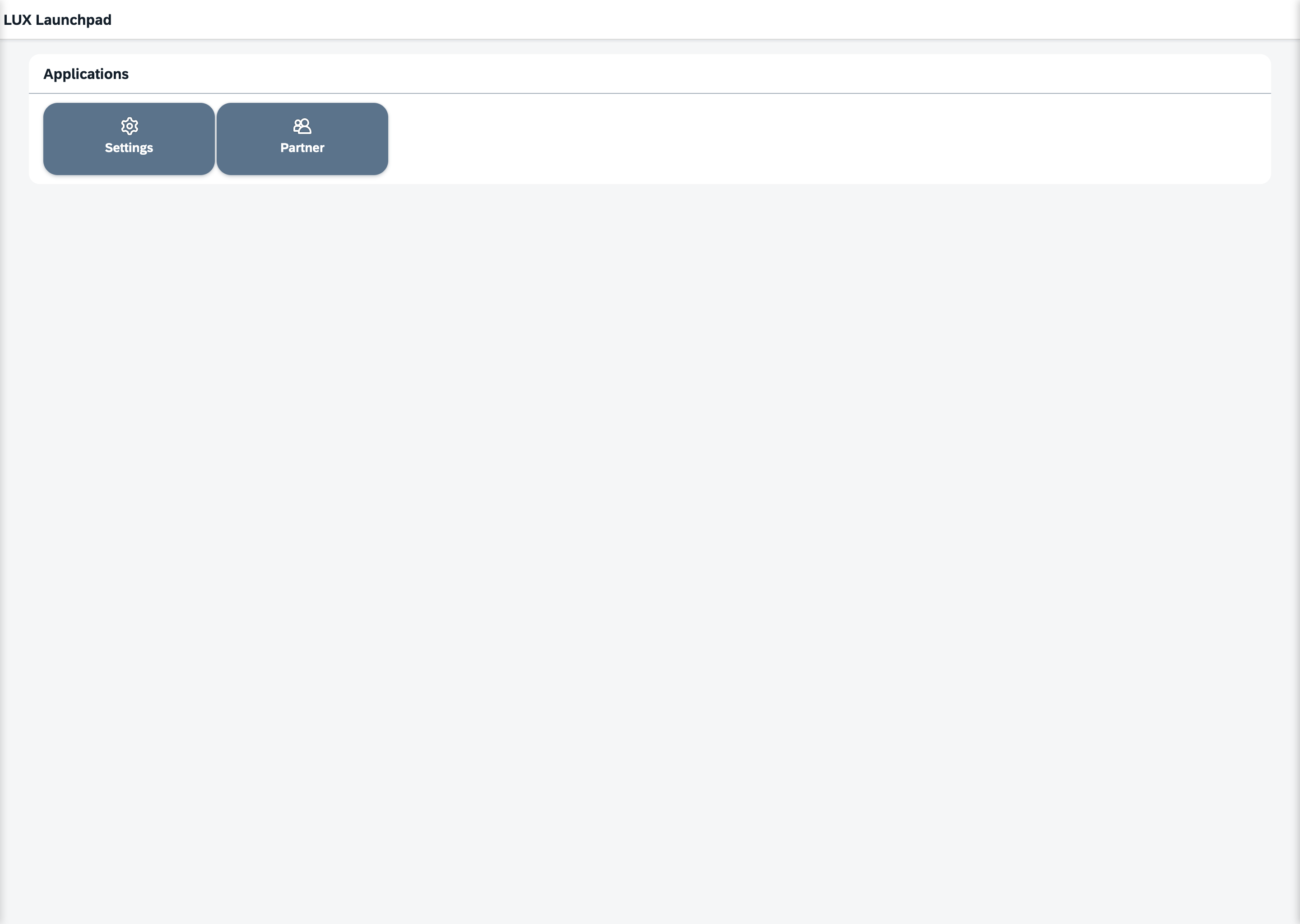
What a user sees today
One page. One panel, titled Applications (Anwendungen in German), holding the launcher tiles the actor may use, ordered by weight. No tabs, no sections, no search, no profile menu inside the app — the identity menu and sign-out live in the shell's rail around it.
That is deliberately less than the Launchpad will be. The declared structure is already richer than the rendering; see The catalogue below and be careful not to read the catalogue as a description of the screen.
Putting your app on it
Three steps, all in your own module.
1 — write a launcher tile. A launcher is a plain GenericTile in icon mode that carries the jump in its parameters. It never navigates itself:
final class OrdersLaunchTileProvider implements TileProviderInterface // LaravelUi5\Core\Ui5\Capabilities
{
    public function getTile(array $slots, Ui5ContextInterface $context): GenericTile
    {
        return new GenericTile(
            header:     'Orders',
            mode:       GenericTileMode::IconMode,
            tileIcon:   'sap-icon://sales-order',
            layoutData: new GridContainerItemLayoutData(columns: 2, rows: 1),
            parameters: ['method' => 'navigate', 'target' => 'app:com.acme.orders'],
        );
    }
}
2 — mark the tile for the Launchpad.
use LaravelUi5\Sdk\Launchpad\Attributes\Launchpad;

#[Launchpad('sales_marketing/sales_pipeline', weight: 10)]
final class OrdersLaunchTile extends AbstractUi5Tile { /* … */ }
3 — register the tile on your own module, in getTiles(), like any other tile. The Launchpad ships no tiles of its own; every tile on it belongs to the module that put it there, and disappears with that module.
weight orders the tiles — higher first, then alphabetically by namespace, never registration order. Scaffold the tile with php artisan ui5:tile rather than by hand (Artisan Commands).
Who sees which tile
A tile is shown to an actor if and only if that actor may open the app the tile jumps to. The Launchpad reads the answer out of the tile's own press intent — the same target the click uses — so there is exactly one declaration of the fact and nothing can drift out of step with it. A tile whose target names no app at all is hidden.
That means you do not authorize the tile. You authorize the app with #[Access] (Permission Levels), and the tile follows.
One gap worth knowing
The pruning happens before any tile data is fetched, and a marked tile that declares required slots is not built at that point — so it is shown to everyone. Launchers don't need slots; if yours does, it is doing more than opening a door, and it needs a vetoer of its own (Contributing tiles).
If a tile's provider throws, that tile is dropped and the page still renders. One broken module cannot take the landing page down with it.
The catalogue
Every launch tile names its place as domain/capability — a coordinate from a closed catalogue of 13 domains and 48 capabilities, derived from APQC's Process Classification Framework.
| Domain | Label | Capabilities |
|---|---|---|
finance_performance | Finance & Performance | core_accounting · treasury_cash · tax_regulatory · fp_and_a · billing_revenue |
procurement_spend | Procurement & Spend | sourcing_contracts · procurement_purchasing · supplier_management · invoices_payments · travel_expense |
supply_chain_logistics | Supply Chain & Logistics | inventory_warehousing · supply_chain_planning · logistics_fulfillment · order_management |
manufacturing_operations | Manufacturing & Operations | production_planning · shop_floor_execution · quality_management |
product_engineering | Product & Engineering | product_lifecycle · rnd_innovation · engineering_design |
sales_marketing | Sales & Marketing | sales_pipeline · digital_commerce · marketing_campaigns · cpq |
service_cx | Service & Customer Experience | customer_support · field_service · customer_success |
human_capital | Human Capital | core_hr · talent_learning · workforce_management · employee_experience |
asset_facilities | Asset & Facilities | enterprise_asset_management · facilities_realestate · fleet_management |
risk_legal_compliance | Risk, Legal & Compliance | governance_risk_compliance · legal_contracts · security_cyber · sustainability_esg |
information_technology | Information Technology | it_service_management · integration_data · admin_governance · developer_tools |
analytics_intelligence | Analytics & Intelligence | business_intelligence · data_management · ai_automation |
workplace_productivity | Workplace & Productivity | collaboration · document_management · project_portfolio |
The machine-readable master ships with the package, at vendor/laravelui5/sdk/Sdk/resources/taxonomy/launchpad-taxonomy.json, with each node's label, icon and APQC lineage. Read it there rather than copying the table.
How to choose. Shelve your app where a buyer would look for it, not where the process is formally owned. The APQC codes in the master record lineage, and one app can legitimately span several of them. Depth stops at these two levels; there is no third.
Declared, not yet rendered
Today the coordinate is captured and nothing more: the launcher renders one flat list, no tabs, and the coordinate is not validated against the catalogue. A typo will not be rejected. Only weight changes what you see. Author the coordinate correctly anyway — it is what the tabs will be built from, and fixing it later means touching every module.
APQC attribution
The catalogue is a derivative work of APQC's Process Classification Framework, used under the licence APQC grants for it. That licence requires the notice to travel with every copy, including this one:
©2026 APQC. ALL RIGHTS RESERVED. This Process Classification Framework® (“PCF”) is the copyrighted intellectual property of APQC. APQC encourages the wide distribution, discussion, and use of the PCF for classifying and defining organizational processes. Accordingly, APQC hereby grants you a perpetual, worldwide, royalty-free license to use, copy, publish, modify, and create derivative works of the PCF, provided that all copies of the PCF and any derivative works contain a copy of this notice.
The catalogue derives from the cross-industry PCF. The industry-specific frameworks carry different terms; do not mix them in.
What lies ahead
The Launchpad's 1.0 is a deliberate minimum, and its final shape is not specified yet. Work known to be ahead of it:
- The taxonomy tabs — rendering the two declared layers as domains and capabilities, and validating the coordinates against the master.
- The profile. Two-factor settings and the settings a user changes for themselves belong here. Until it exists there is no self-service surface for personal settings, because the Settings app opens for administrators only.
- Favourites, pinning and arrangement, notifications, and in-app theme switching.
- In-app help. The Launchpad ships no help topic yet, so F1 on it opens the table of contents.
The tile arrangement is explicitly provisional: the set of apps you see and the per-tile isolation are stable, how they are laid out is not yet a commitment.
See also
- LeanShell Overview: the chrome around the Launchpad
- Impersonation: why the landing must be ungated
- Contributing Tiles & Cards: the general form of tile contribution
- Permission Levels: the
#[Access]a tile's visibility follows